Terminology Database Security
With the WorldServer security features for terminology database management, you have the following capability:
This capability is achieved through a combination of:
User Type Permissions for Terminology Databases
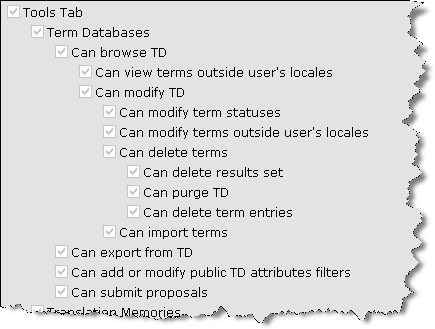
The User Type permissions that control terminology database access are shown in this excerpt from the User Type permissions list for a user type in the Management > User Setup > User Types > User Type: <Type> page.
Figure 19: User Type Permissions Controlling Terminology Database Access
These permissions have the following effect:
  • Can modify terms outside user's locales: With this option, you can configure users who will be able to see terms in all languages, but modify only terms in languages for which they have permission. If you do not have modify permission for a language, the usual modification operations (edit, delete, change status) will not be available for terms that you are viewing in that language, and you will not be able to create new terms in that language. This option is not selectable unless Can view terms outside user's locales is also selected.
  • Can delete terms: This option controls whether a user can delete terms. If you have this permission, you can delete individual terms.
  • Can delete result set: This option controls the availability of the Delete Result Set button.
  • Can delete term entries: This option controls whether a user can delete term entries, including all terms in that term entry.
  • Can import terms: This option controls the availability of the Import TD button.
  • Can export from TD: This controls the availability of the Export TD and Export Result Set buttons.
  • Can submit proposals: This option controls whether a user can submit proposals. It can be given to users who do not have TD write permission.
These permissions can interact with each other. Their dependencies cannot be expressed with the tree structure alone:
  • To be able to delete term entries (Can delete term entries) from the main term management screen, you need both the Can delete terms permission and the Can modify terms outside user's locales permission. This is because while you might be able to delete individual terms, the ability to delete entire term entries implies the ability to delete terms in any language.
  • Similarly, the ability to change a term's status (Can modify term statuses) requires the ability to modify that term. This comes from locale membership or the Can modify terms outside user's locales permission.
  • Modification requires browse permission. If you do not have the Can view terms outside user's locales permission, you cannot modify those terms even if you have the Can modify terms outside user's locales permission. Again, the user interface enforces this.
Attribute Masking for Terminology Databases
By default, all term entry and term attributes are visible in all term databases. In a WorldServer installation with many independent term database endeavors, the cumulative number of attributes defined can be overwhelming. WorldServer will allow you to control the visibility of term entry and term attributes in such situations so users of a term database will see only attributes relevant to that term database.
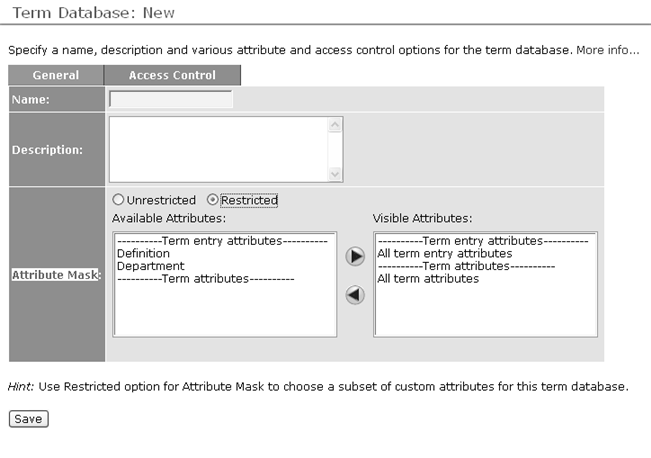
Under the General tab in the Terminology Database definition page, the Attribute Mask field controls the visibility of attributes. Radio buttons (Restricted and Unrestricted) indicate whether an attribute mask will be applied for that terminology database. By default, all term entry and term attributes will be visible for that term database (Unrestricted), and the attribute selector fields are not visible. If you select the Restricted option, the attribute selection fields appear, allowing you to select attributes that will be available when you import, add or edit terms.
Figure 20: Term Attributes Available in Restricted Mode
When searching an individual terminology database with attribute masking, only those attributes relevant to that term database are available for searching. This affects the advanced search filter and Freeform SQL search. When searching a TD Group, a superset of attributes relevant to its individual term databases is available for searching.
Access Controls for Terminology Databases
In the Access Control tab, you can configure the visibility and modifiability of individual term databases.
Note: ACLs do not apply to the out-of-the-box Admin user. The Admin user has access to all TDs, regardless of the ACLs defined.
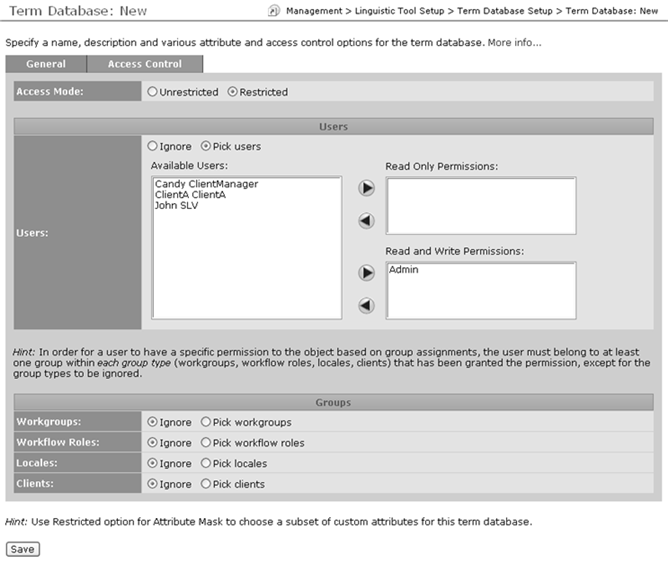
By default, access control is disabled for the term database (Unrestricted) meaning that only user type permissions apply. The permissions selector fields are not visible. If you select the Restricted option, the permissions selector fields appear. These permissions control what users or groups have read or write access to specific term databases.
Note: These ACL permissions mask existing user type permissions. To browse a term database, your user type must have TD browse permission and Read ACL permissions for that term database. Similarly, to be able to modify a term you must have TD modify permission for your user type and Write ACL permissions for that term database.
Figure 21: Access Control tab of Terminology Database definition page
The Users section configures the user access controls. This section configures ACL permissions for users in addition to those who receive permissions from the Groups section below it. In other words, users configured here are additive in relation to the group access controls.
The lists in this Users section are:
  • Available Users – This is a list of all available users that have not been assigned permissions. For example, if the user is assigned to the read only permission, that user’s name will be removed from this list. To assign the user to the read and write permission, the user must be first moved back to this list, and then reassigned. Users cannot be assigned to multiple permission lists since the permissions are tiered. There will be an “All Users” entry that will be available from the list provided no users have already been assigned. This will allow all users to be given the permission without having to select and move each explicitly.
  • Read and Write Permissions – These are the users that have been explicitly given read and write permissions.
  • Read Only Permission – These are the users that have been explicitly given read only permissions.
Note: When a user saves a terminology database whose access mode is Restricted, WorldServer ensures that this user retains Read and Write Permissions. If the current user has been moved to the Available Users or Read Only Permission list, WorldServer inserts that user in the Read and Write Permissions list, and then saves the terminology database.
The Groups section contains the access control options for each supported user group. The control option settings assigned to each group in this section intersect to establish which users have the permissions in addition to those specified explicitly by the user assignments. There are four user group types in the Groups section:
  • Workgroups
  • Workflow Roles
  • Locales
  • Clients
For each such group type, you have the option of explicitly assigning permissions for those groups. The authorized users for each permission is the intersection of users identified in each unignored group type. That is, for you to have read and write permission for the TD, you must have read and write permission in all group types that are not ignored. The relationship between the Available <group type>, Read and Write Permissions and Read Only Permissions controls are the same as in the Users section described above.
Effect of Restricted Mode on TD Import
WorldServer enforces attribute and term visibility and write restrictions when importing a terminology database. That is, you should not be able to bypass term or attribute write restrictions by importing a terminology database.
When importing a term database, WorldServer does not let you map an incoming attribute to a destination attribute that is not permitted for that term database. Similarly, WorldServer will not let you map an incoming term to a destination language for which you have no write ACL permission. At the term/attribute mapping screen, WorldServer displays the menus with the attributes or languages to which you can map an incoming attribute or term. Languages that you cannot use are omitted from the language drop-down. For attributes, the menu is a little different: to prevent creation of redundant attributes during import, disallowed attributes are displayed (sorted to the end of the list and disabled) for informational purposes. If you want to use a disallowed attribute, you should add that attribute to the term database's list of attributes in the term database definition screen.
Upgrading to the New Validation Security Model
In releases prior to WorldServer 9.0, WorldServer allowed you to set up term databases with three possible validation modes: None, Normal and Strict. These determined a term's status (Approval Required or Approved) when it was added or modified. With the introduction of new term statuses and the term proposal feature, term database validation modes no longer apply:
  • When you propose a new or changed term, the term will always get a status of Proposed.
  • When you approve a proposal, that term will always get whatever status you select.
  • When you import terms, you may elect to have them imported under a specific status, or to follow the status of the incoming terms.
  • If you have sufficient permission, you can select the term's status when you add or change a term.
In other words, validation security is now based on user permission rather than term database's validation mode. A WorldServer term database definition no longer has a Validation Mode field. Any previous validation mode setting will have no effect after upgrading to the new version of WorldServer. The basic logic of the old term database validation modes can still be expressed with comparable user-based security. To maintain your old model, you will need to set up your users with appropriate user type permissions and ACL permissions:
  • A validation mode of None meant users with write ACL permission are not restricted from introducing terms for immediate use. You can express this by providing all users who have TD write ACL permission with term status modification user type permission.
  • A validation mode of Normal meant that users can modify terms in-place but new terms will need approval. You can express this by providing such users with TD modification user type permission but no term status modification user type permission. They will be able to modify active or deprecated terms without changing their status, but any new terms that they add or propose will start off in Proposed state.
  • A validation mode of Strict meant that both modified and new terms need approval. You can express this by providing users with the ability to submit term proposals. They can propose new terms or changes to existing terms, but these proposals need to be approved before they take effect. One difference from the new version 9.0 framework is that with Strict validation mode, changing a term will immediately give the existing term an Approval Required status: you might have sufficient permission to invalidate a term (effectively taking it out of active use) by modifying it, but lack permission to reinstate it. There does not seem to be a meaningful use case for such a scenario, so the Strict validation mode should be sufficiently covered by the proposal framework.
User type permission is assigned to users, but TD validation mode is assigned to term databases. To make the validation security map on a per-database basis, you can use the previously described term database ACLs to fine-tune per-database access for each user. One specific capability that this new security model does not address is variable write access to different term databases: you cannot configure a user to have full write and status modification permission on one term database and restrict that same user's status modification permission on another term database. This is because access control permissions only cover broad read and write permissions. A user can have either read-only or read/write access to a term database.
The following table lists the user type permissions and terminology database ACL permissions needed for each operation. User type permissions are organized in a hierarchy: having a permission implies also having its parent permission.
For example, the first table row indicates that, when you perform a terminology database search, if you have only the Can browse TD user type permission and Read ACL permission for the terminology database, you can only search for terms in languages whose locales are mapped to you. If the terminology database contains terms in German, Spanish, and Russian, and you only have the German locale mapped to you, your result set will include only German terms. If you had, additionally, the Can view terms outside user's locales permission (see the second table row), you would also see the Spanish and Russian terms.
Operation
Required User Type Permission
Required ACL Permission
Browse/search terms in own languages
Can browse TD
Read
Browse/search terms in all languages
Can view terms outside user's locales
Read
Propose new/changed term in own language
Can submit proposals
Read
Propose new/changed term in all languages
Can view terms outside user's locales
Can submit proposals
Read
Modify term entry attributes
Can modify TD
Write
Modify terms (including attributes) in own languages
Can modify TD
Write
Modify terms (including attributes) in all languages
Can view terms outside user's locales
Can modify terms outside user's locales
Write
Change term status in own languages
Can modify term statuses
Write
Change term status in all languages
Can view terms outside user's locales
Can modify terms outside user's locales
Can modify term statuses
Write
Delete terms in own languages
Can delete terms
Write
Delete terms in all languages
Can view terms outside user's locales
Can modify terms outside user's locales
Can delete terms
Write
Delete term entries
Can view terms outside user's locales
Can modify terms outside user's locales
Can delete term entries
Write
Delete result set
Can delete result set
Write
Purge TD
Can purge TD
Write
Import terms in own languages
Can import terms
Write
Import terms in all languages
Can view terms outside user's locales
Can modify terms outside user's locales
Can import terms
Write
Import terms in specific status
Can import terms
Can modify term statuses
Write
Export terms
Can export terms
Read
Create validation workflow
Can view terms outside user's locales
Can modify term statuses
Can modify terms outside user's locales
Write
Approve proposed terms in own languages
Can modify term statuses
Write
Approve proposed terms in all languages
Can view terms outside user's locales
Can modify term statuses
Can modify terms outside user's locales
Write
Permissions Controlling the TD Search Interface
The search screen has many buttons, many of which may not be visible. The presence or absence of such user interface elements indicate the presence or absence of functionality due to the user type permissions or terminology database ACL permissions you have.
Button
Required User Type Permission
Required ACL Permission
Propose Entry...
Can submit proposals
Read
Add Entry...
Can modify TD
Write
Import TD...
Can import terms
Write
Import status field in import dialog
Can import terms
Can modify term statuses
Write
Export TD...
Can export from TD
Read
Purge TD Data
Can purge TD
Write
Validate TD...
Can modify term statuses
Write
Delete
Can delete term entries
Write
Export...
Can export from TD
Read
Delete Result Set...
Can delete result set
Write
Export Result Set...
Can export from TD
Read
Project from Result Set...
Can modify term statuses
Write
Permissions Controlling the Term Viewer and Editor
The term viewer/editor screen has many buttons and other user interface elements, many of which may not be visible. The presence or absence of such user interface elements indicate the presence or absence of functionality due to the user type permissions or terminology database ACL permissions you have.
Button
Required User Type Permission
Required ACL Permission
Edit Entry
Can modify TD
Write
Propose Entry Change
Can submit proposals
Read
Activate all Proposed Terms
Can modify term statuses
Write
Propose Term Change
Can submit proposals
Read
Term status modification controls
Can modify term statuses
Write
Change proposal management buttons in Proposed Changes field
Can modify term statuses
Write
Edit Term
Can modify TD
Write
Delete
Can delete terms
Write
Propose New Term
Can submit proposals
Read
Add New Term
Can modify TD
Write
Parent Topic
What is a Terminology Database?