Overview: AutoSuggest
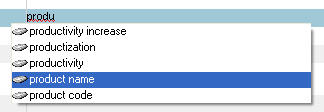
AutoSuggest editing is an optional feature which can be used to speed up manual translation. AutoSuggest monitors what you are typing and, after you have typed the first few characters of a word, presents you with a list of suggested words and phrases in the target language that start with the same characters. If one of the words or phrases matches what you were about to type, you can automatically complete the word or phrase by selecting it from the list. As you continue to type, the list of suggested words is continuously updated.
Setting up AutoSuggest
To use AutoSuggest, you must first enable it in the Options dialog box. This is where you can also control how and when AutoSuggest presents suggestions.
You can use the following as sources for AutoSuggest:
AutoSuggest dictionaries - create a new or select an existing AutoSuggest dictionary created by yourself or another user. This dictionary contains words and phrases extracted from translation memories (.sdltm) or .tmx files.
An SDL MultiTerm termbase selected in your project.
AutoText entries - create a list of words and phrases manually by typing them into SDL Trados Studio.
NOTE |
If you are using a Freelance edition of Studio, you can purchase an add-on that enables you to create an AutoSuggest dictionary. Review your order details to see if this was included in your purchase. |
Related Topics
How to Set Up AutoSuggest Editing
How to Create an AutoSuggest Dictionary
How to Add an AutoSuggest Dictionary
How to Import AutoText Entries
How to Improve Your AutoSuggest Results
How to Sort Your AutoSuggest Results
Topic: Published: November 10, 2014