

| Saving to different file types |
From the intermediary format (currently mostly SDL XLIFF) users need to be able to generate a target document, which will often be the native format (e.g. DOC, PTT, etc.). In some cases, users also need to be able to generate another bilingual intermediary format such as TTX or ITD. This is the case when SDL Trados Studio 2017 is used to process TTX/ITD files that came from SDL Trados 2007 or SDLX 2007 and the users of SDL Trados Studio 2017 need to deliver TTX/ITD files for further processing in an SDL Trados 2007/SDLX 2007-based supply chain.
When a user of SDL Trados Studio 2017 is required to do a translation, which can then be further processed by a user of SDL Trados 2007 or SDLX 2007, he/she will have to proceed in the following way:
- Pre-process the native file in SDL Trados 2007, e.g. by opening it in TagEditor and by saving it as TTX (TradosTag)
- Open the resulting TTX file(s) in SDL Trados Studio 2017. While the TTX or ITD files are processed in SDL Trados Studio 2017, they are saved in the intermediary format used by SDL Trados Studio 2017 just like any other (native) file (e.g. in SDL XLIFF).
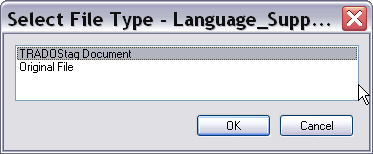
When you process a TTX (or ITD) file in SDL Trados Studio 2017, you have a choice between generating a TTX or the original document format. The latter requires you to have the original document (e.g. DOC) in the same folder as the TTX file. The reason for this is that TTX uses the original document as dependency file, which is not embedded in the TTX document itself.
 CommunityComments