

| Implement the UI Controller Class |
In this chapter you will learn how to implement a class that controls the actual plug-in user interface.
When implementing control for the plug-in user interface, you basically need to cover the following scenarios:
- The user clicks the Reset to Defaults button, thereby restoring all control elements to their intended default settings.
- The user clicks OK, thereby applying (saving) the settings.
- After changing the control element settings, the user goes to another settings page, which should also save any changes to the form control elements.
- The user clicks the Cancel button, any changes to the control settings should be discarded.
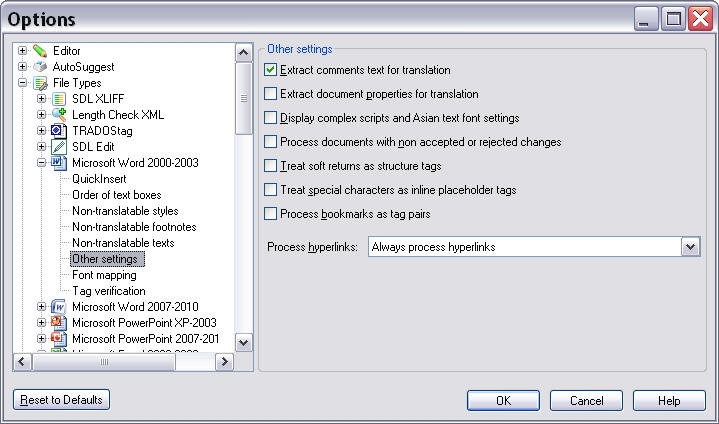
Below you see an example of a settings page as it is implemented for one of the default file types in SDL Trados Studio 2017:
 Implement the Settings Page Class
Add a class called e.g. SettingsPage.cs to your project. This is one of the classes that is referenced from the File Type Component Builder file, which was covered in one of the previous chapters (see Create a New File Type Component Builder), i.e. it is not the UI class itself that is referenced in the File Type Component Builder. Without this reference, the plug-in UI would not be recognized and displayed by SDL Trados Studio 2017.
This class acts as an intermediary between the plug-in UI (see Implement the User Interface) and the class that is used to store and retrieve the settings to/from the settings bundle (see Loading and Saving the Settings).
This class needs to use the following namespaces:
- Sdl.FileTypeSupport.Framework.Core.Settings
- Sdl.Core.Settings
- Sdl.Core.PluginFramework
Moreover, this component needs to be derived from the AbstractFileTypeSettingsPage class, which provides the methods for setting the plug-in UI according to the values of the settings class.
Reset to the Default SettingsThe ResetToDefaults is triggered when the user clicks the button Reset to Defaults in the user interface.
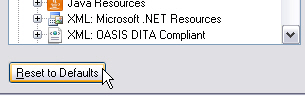
In our implementation we override this method as shown in the example below. We call the base class to make sure that the settings are reset correctly, and then make sure we update the settings accordingly:
public override void ResetToDefaults()
{
    base.ResetToDefaults();
    Control.UpdateControl();
}
Reload the SettingsWhen the user moves back to the settings page of our plug-in, we need to make certain that the plug-in UI is displayed with the most up-to-date settings from the settings bundle. This is done through the ReloadSettings method, which we override as shown below. Here, we must calll the base class to make sure that the settings are reloaded correctly before updating the UI:
public override void Refresh()
{
    base.Refresh();
    Control.UpdateControl();
}
Declare the Class in the File Type Component BuilderFor the plug-in settings UI to become visible in SDL Trados Studio 2017, the File Type Component Builder file needs to include the following method. You may open the *.sdlfiletype file in a text editor, then search for <WinFormSettingsPageIds>, and add the node to the list of settings page IDs.
<property name="WinFormSettingsPageIds">
  <list>
      <value>SimpleText_Settings</value>
        <value>QuickInserts_Settings</value>
    </list>
</property>
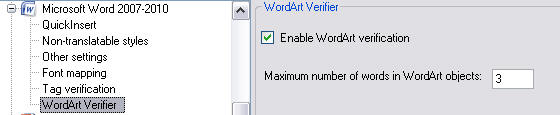
Putting it all Togetherusing System; using System.Collections.Generic; using System.Linq; using System.Text; using Sdl.Core.Settings; using Sdl.FileTypeSupport.Framework.Core.Settings; namespace Sdl.Sdk.FileTypeSupport.Samples.WordArtVerifier { /// <summary> /// This class controls the plug-in user interface. It controls what happens, for example, /// when the user clicks the button in the user interface for resetting the control elements /// to their default values. This class is referenced in the file type definition. Without /// this reference in the SDLFILETPYE file, the plug-in user interface would not be available /// to the end user. /// </summary> [FileTypeSettingsPage(Id="WordArtVerifier_Settings", Name="Settings_Name", Description="Settings_Description")] class SettingsPage : AbstractFileTypeSettingsPage<SettingsUI, VerifierSettings> { /// <summary> /// Triggered, when the user clicks the button Reset to Defaults button in /// SDL Trados Studio. Restores the default check box state, which should /// be Checked (i.e. verification function enabled), and the default maximum /// word count, which is 3. /// </summary> #region "ResetToDefaults" public override void ResetToDefaults() { base.ResetToDefaults(); Control.UpdateControl(); } #endregion /// <summary> /// Triggered when the user raises the plug-in UI, whose controls (in this case the check box /// and the maximum word count text field) will then be set according to the values stored in /// the settings bundle. /// </summary> /// <param name="settingsBundle"></param> #region "ReloadSettings" public override void Refresh() { base.Refresh(); Control.UpdateControl(); } #endregion } }
See AlsoCommunityComments