

| Creating a New Project |
In this chapter you will learn how to properly set up a project for developing a file type plug-in.
 Create the Project
Before you start developing plug-ins for SDL Trados Studio 2017, you should make sure that the SDL SDK is installed on your development computer. The SDK installer will add new templates to your Microsoft Visual Studio environment, as illustrated in the screenshot below. For the type of plug-in discussed in this chapter, we require the SDL Trados Studio 2017 Plug-in Project template.
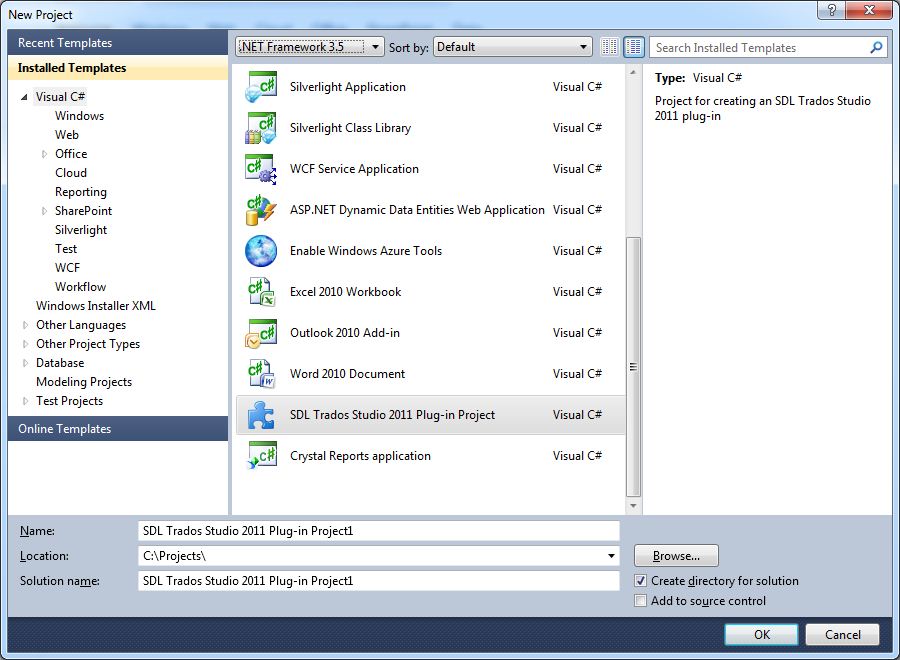
By default, when you create a project based on this template, the project name will be e.g. SDL Trados Studio 2017 Plug-in Project1. Change the project name to Sdl.Sdk.FileTypeSupport.Samples.SimpleText for our sample implementation.
Add the Required ReferencesThe plug-in template will come with the Sdl.Core.PluginFramework.dll reference. For our file type plug-in implementation, we also need to reference the SDL File Type Support Framework, i.e. Sdl.FileTypeSupport.Framework.Core.dll. For implementing the functionality required by our example, you need to add the libraries used for integration with SDL Trados Studio 2017, which are as follows:
- Sdl.FileTypeSupport.Framework.Core.Settings.dll
- Sdl.Core.Settings.dll
- Sdl.Core.Globalization.dll
- Sdl.FileTypeSupport.Framework.Core.Utilities
By default these files can be found in the installation folder of SDL Trados Studio 2017, i.e. C:\Program Files\SDL\SDL Trados Studio\Studio5. The 'Copy Local' property for these references should be set to True.

 Note Note |
|---|
Do not forget to sign the assembly. Otherwise, your plug-in might not be loaded by SDL Trados Studio 2017 |
See AlsoOther Resources
CommunityComments