

| About projects |
This section provides a high-level overview of projects in the Project Automation API context.
We define a localization project as the data, resources and process required to localize a set of source files in a given language, the source language, into one or more target languages. As implied in this, the main inputs to a translation project are:
- The documents to translate: Files to translate are the main input, although various other file types come into play in real-life project, as explained in the About project files section.
- The source language: This is the language of the files that need to be translated. At the moment, projects only support one source language. At the same time, files with mixed-language content are not supported either.
- The target languages: A single project models the translations of files into one or more target languages. The main reasons for this are the usefulness of being able to manage this translations together and the fact that some processing (manual and automated) on the source language content can be shared between these translations.
Apart from the files to translate and the language information, an important aspect of a project is configuration. This configuration ranges from which translation memories and termbases to use for the project, over settings for specific automated steps in the project preparation process or workflow, up to custom settings for integration purposes with external systems.
Apart from data and settings, the process followed during the execution of a localization project is an important aspect. The Project Automation API addresses this through the concepts of tasks, which can be automated (file preparation, translation memory analysis) as well as manual (translation, review). Tasks can be run in an automated fashion, driven by a workflow, or in a more ad-hoc way.
Another important aspect of translation projects is their distributed nature. Frequently, the participants in a single localization project are spread across the globe and vary in size from large corporations, who produce content, over language service providers, who provide localization project management to freelance translators and reviewers. This aspect of localization projects is commonly referred to as the localization supply chain. The Project Automation API provides a way to deal with this, through the concept of packages: work (manual tasks) can be sent across the localization supply chain bundled into packages, containing for instance files to translate together with configuration and settings. These packages can be produced and opened by tools like SDL Trados Studio.
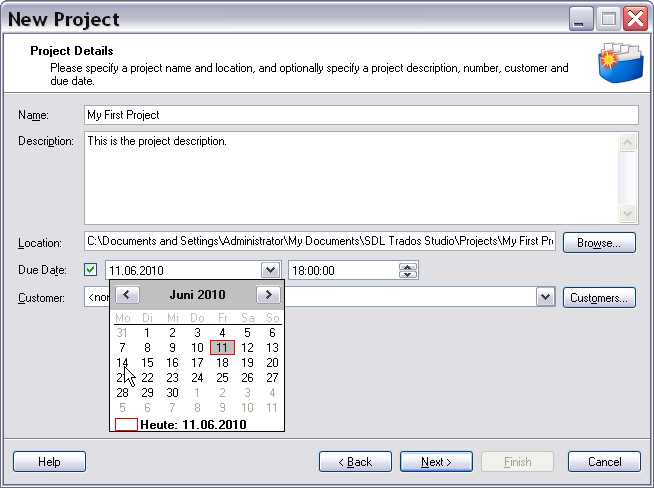
In SDL Trados Studio projects are either created by opening a single file or by running the New Project wizard as shown in the above screenshot.
 CommunityComments