

| Retrieving Database Servers |
In this chapter you will learn how to get programmatic access to the database server(s) that is/are used by the SDL TM Server.
 Add a New Class
Start by adding a new class called ServerDBServers to your project. Add a public function called GetDBServers, which takes a TranslationProviderServer object as parameter. Call this function from Connect as shown below:
ServerDBServers dbServ = new ServerDBServers();
dbServ.GetDBServers(tmServer);
In the GetDBServers function the GetDatabaseServers method is applied to the server object. Then the function loops through the database servers that are registered for the given TM server. Although most setups involve only a single database server, it is conceivable that the SDL TM Server connects to several DB servers.
public void GetDBServers(TranslationProviderServer tmServer)
{
    string serverInfo = string.Empty;

    foreach (DatabaseServer dbServer in tmServer.GetDatabaseServers(DatabaseServerProperties.None))
    {
        serverInfo += "Server name: " + dbServer.ServerName + "\n";
        serverInfo += "Friendly server name: " + dbServer.Name + "\n";
        serverInfo += "Server description: " + dbServer.Description + "\n";
        serverInfo += "Server type: " + dbServer.ServerType + "\n\n";
    }

    MessageBox.Show(serverInfo, "Container Information");
}
Below you see an example of a box containing information on a particular DB server in the SDL TM Server Manager:
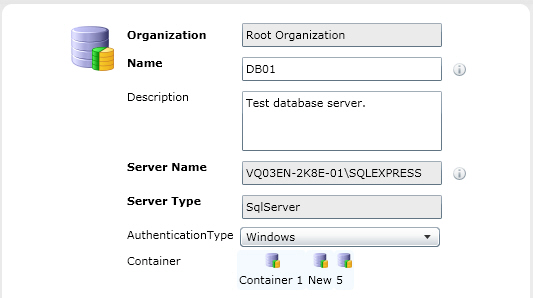
Putting it All TogetherThe complete class looks as shown below:
namespace Sdl.SDK.LanguagePlatform.Samples.TmAutomation
{
    using System.Windows.Forms;
    using Sdl.LanguagePlatform.TranslationMemoryApi;

    public class ServerDBServers
    {
        #region "get"
        public void GetDBServers(TranslationProviderServer tmServer)
        {
            string serverInfo = string.Empty;

            foreach (DatabaseServer dbServer in tmServer.GetDatabaseServers(DatabaseServerProperties.None))
            {
                serverInfo += "Server name: " + dbServer.ServerName + "\n";
                serverInfo += "Friendly server name: " + dbServer.Name + "\n";
                serverInfo += "Server description: " + dbServer.Description + "\n";
                serverInfo += "Server type: " + dbServer.ServerType + "\n\n";
            }

            MessageBox.Show(serverInfo, "Container Information");
        }
        #endregion
    }
}
See AlsoOther Resources
CommunityComments