Translation Memory Security
Translation memory in WorldServer has the following security features:
This capability is achieved through a combination of:
User Type Permissions
The User Type permissions that control TM access are shown in this excerpt from the User Type permissions list for a user type in the Management > User Setup > User Types > User Type: <Type> page. This excerpt is in the Tools Tab section.
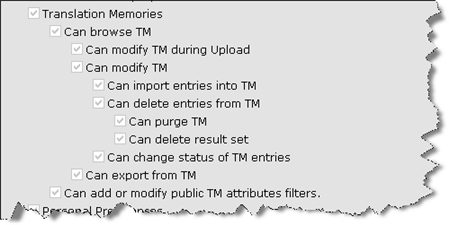
Figure 27: User Type Permissions Controlling Translation Memory Access
These permissions, in combination with ACL permissions, control the following:
  • Translation Memory – Gives access to Tools > Translation Memories
  • Can browse TM – Allows you to browse a translation memory.
  • Can modify TM during upload – allows you to modify translation memory entries only during the upload of a translation kit to WorldServer. If this option is set, when you upload the translation kit, you are presented with the additional option: Update the WorldServer Translation Memory? If you choose to do so, the kit import will update the TM. If you allow full access, users can modify, delete, and see other TM entries. If you switch all the other TM permissions off and only leave this one enabled, you limit users to uploading their own work for their own assets that they are assigned to work on.
  • Can modify TM – Allows you to modify translation memory entries.
  • Can import entries into TM – Controls the availability of the Import TM from TMX File button in Tools > Translation Memories > Translation Memory: <TM> .
  • Can delete entries from TM – controls the availability of the Delete Selected button in Tools > Translation Memories > Translation Memory: <TM> that appears when you have searched and have a result set.
  • Can purge TM – controls the availability of the Purge TM Data button in Tools > Translation Memories > Translation Memory: <TM> .
  • Can delete result set – controls the availability of the Delete Result Set button in Tools > Translation Memories > Translation Memory: <TM> that appears when you have searched and have a result set. When you enable this button, the Delete Selected button is also enabled.
  • Can change status of TM entries – TM entries have statuses when you are in Live TM mode. This permission governs a user's ability to change status for a TM entry.
  • Can export from TM – controls the availability of the Export TM as TMX File, Export Selected, and Export Result Set buttons in Tools > Translation Memories > Translation Memory: <TM> that appear when you have searched and have a result set.
  • Can add or modify public TM attributes filters – With this permission, you can choose to "Make this filter public" when you add or modify an attribute filter using the Attribute Filter Editor.
Access Controls for Translation Memory
In the Access Control tab, you can configure the visibility and modifiability of individual translation memories.
Note: ACLs do not apply to the out-of-the-box Admin user. The Admin user has access to all TMs, regardless of the ACLs defined.
By default, access control is disabled for translation memory (Unrestricted) meaning that only user type permissions apply. The permissions selector fields are not visible. If you select the Restricted option, the permissions selector fields appear. These permissions control what users or groups have read or write access to specific translation memories.
Note: These ACL permissions work in tandem with existing user type permissions. To browse a translation memory, your user type must have TM browse permission and read ACL permissions for that translation memory. Similarly, to be able to modify a TM entry, you must have TM modify permission for your user type and write ACL permissions for that translation memory.
Note: When a user saves a translation memory whose access mode is Restricted, WorldServer ensures that this user retains Read and Write Permissions. If the current user has been moved to the Available Users or Read Only Permission list, WorldServer inserts that user in the Read and Write Permissions list, and then saves the translation memory.
TM group permissions will be derived from the TMs used within the TM group. A user will be allowed read permissions to the TM group as long as one TM within the group allows read permissions to that user. In such cases, TM entries can only be read or leveraged from TMs that allow the user read permissions. Access to management of TM groups trumps ACL permissions. For instance, if the user requests a list of all TMs in the TM group, he is only given a sub-list of those TMs for which he has permission to read.
Similarly, a user can only write to a TM group if the user has write permissions to the TM configured as the write TM for that TM group.
Attribute Masking for Translation Memory
By default, all TM entry and TM attributes are visible in all translation memories. In a WorldServer installation with many independent translation memory instances, the cumulative number of attributes defined can be overwhelming. WorldServer allows you to control the visibility of TM entry and TM attributes in such situations so users of a translation memory will see only attributes relevant to that TM.
Under the General tab in the Translation Memory definition page, the Attribute Mask field controls the visibility of attributes. Radio buttons (Restricted and Unrestricted) indicate whether an attribute mask will be applied for that TM. By default, all TM entry attributes will be visible for that TM (Unrestricted). and the attribute selector fields not visible. If you select the Restricted option, the attribute selection fields appear, allowing you to select attributes that will be available when you import, add or edit TM entries.
When searching an individual TM with attribute masking, only those attributes relevant to that TM are available for searching. This affects the advanced search filter and Freeform SQL search. When searching a TM Group, a superset of attributes relevant to its individual TM is available for searching.
Summary Table of User Type and ACL Permissions for Translation Memory
The following table lists the user type permissions and TM access control permissions needed for each TM operation. User permissions are organized in a hierarchy: having a permission implies also having its parent permission.
Operation
User Type Permission
ACL Permission
Browse/search TM entries
Can browse TM
Read
Modify TM entries on upload
Can modify TM during upload
Write
Modifying TM entries
Can modify TM
Write
Importing TM entries
Can import entries into TM
Write
Deleting TM entries
Can delete entries from TM
Write
Purging entire TM
Can purge TM
Write
Deleting browse/search results
Can delete result set
Write
Manage public TM attribute filters
Can add or modify public TM attributes filters
Write
Export TM entries
Can export from TM
Read
Lock TM Entries
Can lock TM entries
Write
Unlock TM Entries
Can unlock TM entries
Write
Parent Topic
Adding and Modifying a Translation Memory