WorldServer Filtering Process
Documents generally contain translatable text mixed in with formatting and display information. Because translators are usually only interested in the linguistic content, it is important to separate the translatable text from all of the non-translatable text, such as HTML tags or formatting information.
For translation purposes, the WorldServer filtering process starts with a document in one of many formats and breaks it into small, logical units of text called segments. These segments can then be translated and recomposed into a translated target document based on the original source document.
A WorldServer content filter handles the following activities:
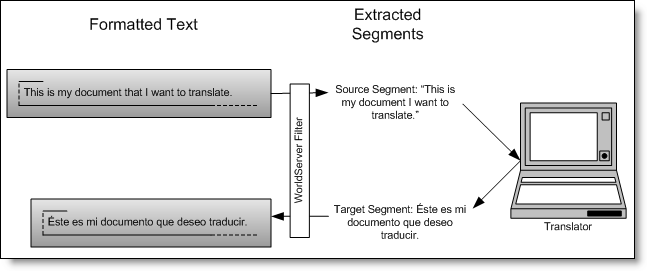
The following figure illustrates how filters typically work:
 
 
Figure 29: Filters extract text from a formatted document and then reassemble the document based on translated text.
The filtering process automatically creates a target file from the source file. If the target file already exists in the asset interface system, it is updated each time the source file goes through the process. Every time the source document is updated within WorldServer or its timestamp is changed, it is resegmented according to the rules specified in the filter.
Filters and File Types
Filters let WorldServer identify translatable text based upon the document file type. Because the exact makeup of translatable text versus other content varies greatly across different file formats, this process is very file-format specific with some common features across multiple file types.
Note: File types are roughly equivalent to MIME types, which can also be added, deleted, and modified on the Management > Administration > Customization page. If necessary, you can modify the default file extension assignments to MIME types on that page.
You can configure some aspects of these filters to specify the text to be translated in your documents. The document is then split into segments based on the specific configuration for that specific document file type. For example, a PowerPoint presentation may contain a master file that the client may or may not want translated.
In some cases, WorldServer provides more than one filter for the same file type. Which one you use may depend on your file contents, system platforms, or translation environment. You can also configure and use multiple filters for each file type, and create a new filter configuration based on a WorldServer default.
Child Topics
File Type Categories
Filter Determination for Segmentation
Filter Configuration and Segmentation
Testing the Content and Filter
Parent Topic
About Filter Configurations