By default, WorldServer imports
terms and set them to Proposed status. It is possible to import both the processing
status and administrative status of a term using WorldServer's Import TD feature.
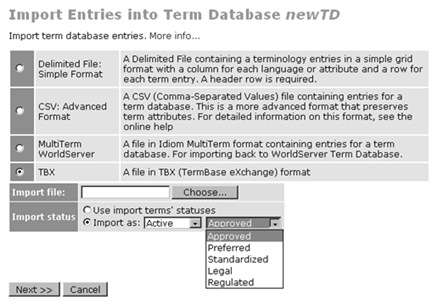
The Import status field of the import page controls how term statuses are imported.
The default is Import
as: Proposed, where all terms receive the status Proposed.
To import predefined term statuses, select one of the following
options:
-
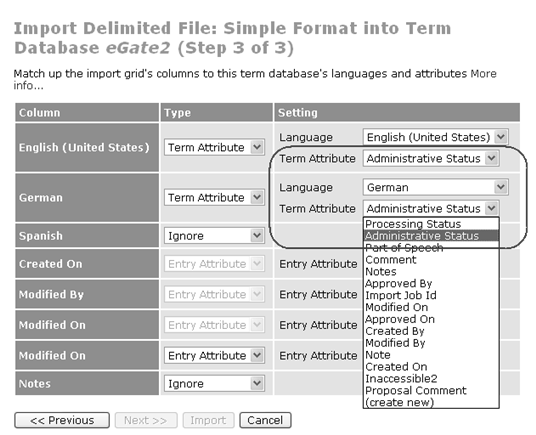
Use import terms' statuses – This mode imports term statuses according to the status attributes found in the import file. The processingStatus attribute specifies the processing status: proposed, processed, or rejected. If the processing status is processed, the processing/administrative statuses will be set to Active/Approved, unless further fine-tuned by an administrativeStatus attribute value. With no valid processingStatus attribute, the term gets whatever processing status (active/inactive) matches the administrative status. In the absence of both the processingStatus and administrativeStatus attributes, the term gets a status of Proposed.Use this import mode if you have an import file that you have validated externally. With this option, you will have the option of mapping the processingStatus and administrativeStatus attributes (otherwise not visible) at the header/field matching page. This mapping is essential for the Delimited File: Simple Format import format. For example, if you want to import the administrativeStatus attributes of a delimited file, you would select Term Attribute for the Type, then Administrative Status for the Term Attribute Setting.
-
Import as: – This lets you specify a specific import status for all terms. Use this import mode if you have terms from a trusted source that you want to import as Approved terms. If you have status changing privileges, you see two selectors in the status row, one for the processing status and one for the administrative status. The administrative status selector appears if the processing status is Active or Inactive and will be populated with the appropriate values for the processing status. The default administrative status for each processing status is the same as for the term viewer: Approved for Active terms, Deprecated for Inactive terms. For Proposed or Rejected terms, the administrative status is irrelevant.
You can validate terms externally. Assuming you have sufficient permissions
to change term statuses, you can export, check, and change the statuses
of terms offline and import those statuses. The following conditions
must be true for this sort of external validation to work:
If you do not have permission to change term statuses, the Import status field
displays the message “All terms will be imported
as Proposed
” instead of providing the status
options. New terms are imported in Proposed status (but
the proposed administrative status is recorded in the proposal). Changes
to existing terms (attributes or status) result in a change proposal
for that term, since you cannot (and should not) change the existing
term's status to Proposed.