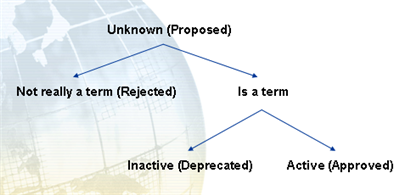
A term, at a given time,
has a status indicating its state
in the cycle of approval for use. The term statuses that WorldServer
supports are listed below. Those anticipated to be most frequently
used are Proposed, Approved, Preferred, Deprecated, and Rejected.
 |
Note: In the linguistic tools industry,
a term can have many kinds of statuses associated with it. The ISO
standard (ISO 12620 section 02), which describes terminology-related
data categories, lists 7 statuses each for the normative authorization
and administrative status data categories, and another 4 for the language
planning qualifier data category (that is, a qualifier—like recommended term, nonstandardized term, proposed term, or new term—assigned to a provisional
term within a language planning or descriptive terminology environment).
WorldServer supports all the statuses in the administrative status
data category, plus a couple of processing statuses. Externally, the
term status corresponds to the administrativeStatus attribute (internal name). This makes
it easier to interchange with other ISO 12620-2 compliant term databases,
particularly through TBX. Additional status information can be represented
using custom WorldServer attributes.
|
These statuses describe both the processing
status and the administrative status of a term. WorldServer uses both types of statuses to correctly
handle a term. A processing status describes the state of a term as
it undergoes validation. A processing status is one of:
The administrative status describes the term after you decide that
it is a term. Once a term achieves
a processing status of Active or Inactive, it is considered a real term and must have
an administrative status. In fact, the administrative status determines
whether the term is Active or Inactive, thereby preventing any conflicts that would
occur if, for example, you assigned a Deprecated administrative
status to an Active term.