If a segment has a translation memory (TM) match,
the TM match button is enabled ( ), indicating that there
are matches for this segment in the translation memory. Clicking the Translation memory matches button brings up the Matches for Segment N
dialog (the Translation memory
matches dialog).
), indicating that there
are matches for this segment in the translation memory. Clicking the Translation memory matches button brings up the Matches for Segment N
dialog (the Translation memory
matches dialog).
), indicating that there
are matches for this segment in the translation memory. Clicking the Translation memory matches button brings up the Matches for Segment N
dialog (the Translation memory
matches dialog).
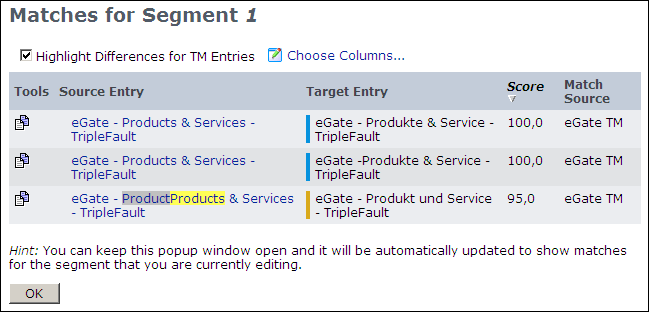
You can use the “paste” icon ( )
to the left of a TM entry to paste it into the target segment at
the current caret position. This dialog indicates the score for this
TM match, and the TM from which each match came. You can leave this
window open and, as you move from segment to segment, it will refresh
to have the content for that segment. This allows you to always see
the TM matches for each segment.
)
to the left of a TM entry to paste it into the target segment at
the current caret position. This dialog indicates the score for this
TM match, and the TM from which each match came. You can leave this
window open and, as you move from segment to segment, it will refresh
to have the content for that segment. This allows you to always see
the TM matches for each segment.
)
to the left of a TM entry to paste it into the target segment at
the current caret position. This dialog indicates the score for this
TM match, and the TM from which each match came. You can leave this
window open and, as you move from segment to segment, it will refresh
to have the content for that segment. This allows you to always see
the TM matches for each segment.
 |
Note: If you have Machine Translation adapters
configured for the target language, you will also get MT matches for
empty target segments. As with the TM matches, you can click the
icon to paste the match text into the
target segment.
|
Matches that initially appear in the target textbox are inserted
when WorldServer segments the asset and computes exact match scores.
In some cases, the match displayed first in the Translation
memory matches dialog may not be the same match that appears
in the target textbox. If there is more than one exact match with
an identical score, the display order may vary.
Details of the translation memory match types are provided in Translation Memory Match Details. You can also click the match
link to open the TM entry editor and edit the entry as needed.