A placeholder is a visual representation
of a piece of embeddable markup.
Rather than exposing the actual markup to the translator, a placeholder
is used to indicate the position of the markup within the segment. This ensures that translators
cannot alter the content of the embeddable markup. Instead, translators
are only allowed to position each placeholder in the target text in the correct location
for the translation. WorldServer requires that all placeholders that
are in the source text also appear
in the target text.
To view the markup that is represented by the placeholders, click
the Placeholder button for that segment. Note that if the placeholder is extremely
long, it may show only the beginning and end portions of the markup,
with an ellipsis in between.
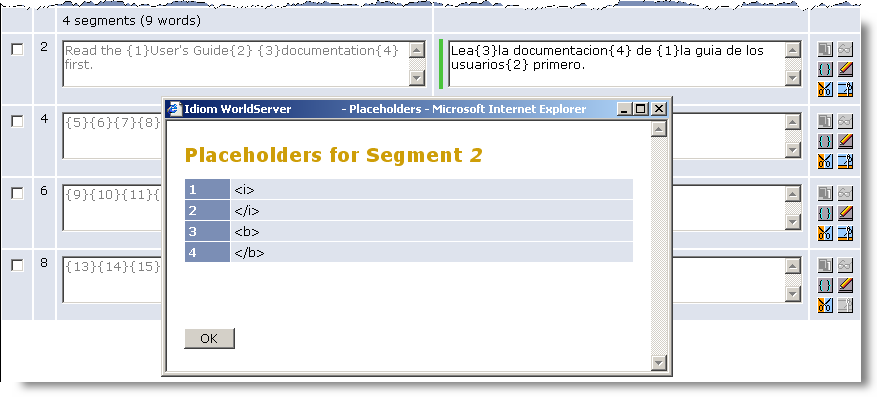
Placeholder Order
As you perform your
translation, you may find that you need to reorder the placeholders
in order to preserve the correct formatting. For example, say you
have the source segment “
Read the <i>Users' Guide</i>
<b>documentation</b> first.
” This might be represented
in the WorldServer Browser Workbench as “
Read the {1}Users' Guide{2} {3}documentation{4}
first.
” If you then translated this into Spanish, you
might find that the order of the words in the sentence changes and
you need to reorder the place holders as follows: “
Lea {3}la documentación{4}
de {1}la guía de los usuarios{2} primero.
” While you can
change the order of the placeholders in the target segment, WorldServer
has the following requirements:
 |
Tip: If you enter content
that looks like a placeholder (that is something like {4} ), you will need to escape
the curly braces. For this example, you would type \{4\}.
|
Placeholder ID Numbering
In general, placeholders
are numbered in sequence from the first segment in the asset to the
last. If you use matches from Translation Memory that have tags that
are not present in the source entry, you may see placeholder IDs that
are out of sequence as you are working. The ID sequence generally
resolves once a server roundtrip takes place (such as when you save
an asset, or add a segment comment), if not before. The temporary
inconsistency is not a cause for concern.
You are most likely
to see numbering inconsistencies when you work with assets or translation
memories (TMs) that are also used by SDL Studio 2011. The following
cases illustrate placeholder ID numbering.
-
In Browser Workbench, if you open an asset which has 100% matches for segments, they are pre-populated from the translation memory (TM). If some tags (such as Studio quick tags) are only present in the target segment, they are assigned unique placeholder IDs. These IDs are larger than the largest placeholder ID than for any source segments.
-
When you paste one of the matches from the Translation memory matches dialog into the asset, the placeholder numbering may appear to conflict with placeholders elsewhere in the document. Once a server roundtrip takes place, the placeholders in the pasted segment will be assigned new, document-level placeholder IDs, and the document will be consistent again. Note, however, that the placeholder IDs will be incremented each time you paste and save.