You can filter the segments displayed in the Browser Workbench by
selecting an item from the filter menu.
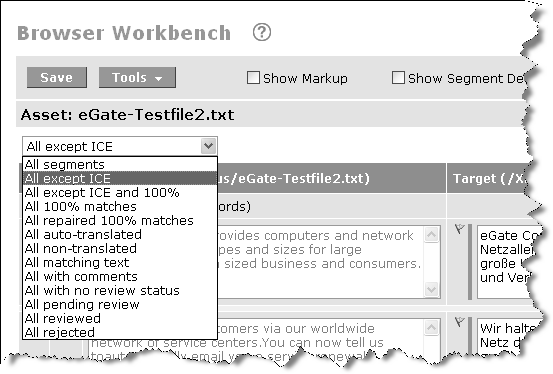
By default, all segments
are displayed. Select a different filter option from the menu to display
only that segment type (for example, if you select All non-translated,
the Workbench will refresh to display only the segments that WorldServer
determines not to translate, but to instead copy the source into the
target segment). You can also search for specific text using this
menu.
The first group of filters
in the drop-down list are based on the type of match found during
the leverage process. The bottom group is based on the segment status.
|
Filter
|
Description
|
|---|---|
|
All segments
|
Shows every segment in the asset.
|
|
All except ICE
|
Shows every segment except those for
which an ICE match was found. This is a good filter for a translator
to use when working, because usually the translator can skip ICE matched
segments. To be characterized as an ICE match, a match candidate must
satisfy the basic criteria for ICE matching—the source text must be
an exact match, and must share a common usage context with the translation
memory entry providing the match. For more about the criteria for
ICE matching, see the WorldServer Translation
Memory Administration Guide.
|
|
All except ICE and 100% match
|
Shows every segment except those for
which an ICE match or a 100% match was found. 100% matches are less
dependable than ICE matches, but you might want to exclude 100% matches
as well as ICE matches, to see only those segments that need the most
work.
|
|
All 100% matches
|
Shows only segments that are 100% matches.
This does not include ICE matches. You might want to inspect 100%
matches to see how dependable they are.
|
|
All repaired 100% matches
|
Shows only segments that have been repaired
to be 100% matches. Repairs are in-memory changes; they are never
automatically stored in TM translation records. If the translator
agrees to the repairs, the translator can choose to add new translation
records to the TM when the asset being translated is saved. To learn
more about repairing segments, see the WorldServer Translation Memory Administration Guide.
|
|
All auto-translated
|
Shows only segments processed by the
translation memory auto-translation mechanism, which copies the source
to the target when it determines that the source does not need translation.
For example, if a segment consists only of punctuation, it will be
auto-translated. Auto-translated segments have a dark red color status
bar. You might want to view the auto-translated segments to see if
in fact you agree that they don't need to be translated.
|
|
All non-translated
|
Shows only segments which have no status
(showing up with a gray bar). This is the initial state of a segment
that is not an ICE or 100% match. Viewing only these segments will
show you segments that have not be translated at all.
|
|
All matching text
|
When selected, this filter includes
a search box, in which you can enter text for which you want to search.
Only segments that include this text are displayed.
|
|
All with comments
|
Shows only segments that have comments
attached. This is helpful for finding comments from the reviewer to
the translator, or vice versa.
|
|
All with no review status
|
Shows only segments that have no review
status assigned to them.
|
|
All pending review
|
Shows only segments that have been marked
to indicate that they have been translated and need review. If a segment
is marked as Pending
Review, then it is the reviewer now "owns" the segment.
|
|
All reviewed
|
Shows only segments that have been marked
to indicate that they have been reviewed, and are ready to move on
through the workflow and be added to the translation memory.
|
|
All rejected
|
Shows only segments that have been rejected
and should go back to the translator. When a translator has had an
asset returned by the reviewer, this is a good filter to show the
problem segments.
|
|
All with errors
|
Shows only segments that have errors.
When a translator (or editor) has an asset sent back from the reviewer,
this filter lets them view only the segments marked with errors. It
is a good idea to enable "Show Segment Details" in the workbench toolbar
when using this filter.
|
The 100% matched count
shows the number of segments in the asset with content from translation
memory as 100% matches. This includes ICE matched segments as well
as single exact matches (segments with blue and purple bars). Normally
this information is applicable only the first time the asset goes
through segmentation. If you change a 100% matched segment manually
and save the changes, the segment then will not be included in the
100% matched segment count because the content of that segment is
now coming from user-entered data rather than the translation memory.
However, if you choose Save and Update TM, the count is refreshed to reflect
a new 100% segment count.
Update functionality
is useful for refreshing the counter after translation memory is reapplied
to a segment or asset. If there are more 100% matches found after
the user reapplies translation memory, then the 100% matched counter
reflects this.
Note that although the
counter includes both ICE and 100% matched segments, the segment filter
shows 100% matched segments only (blue bars) and does not show ICE
matched segments.
In a large file (where
there are over 100 segments on a page—which is possible if you have View all pages selected),
the system stops checking TM and TD matches per segment, to limit
the number of queries being issued. In this case, a question mark
is placed on the match indicator icon and you need to click on the
item to see whether there are any TM or TD matches.