The concordance search tool lets you search translation
memory and, optionally, machine translation for a word or phrase that
you are unsure about, to give you examples of how the word or phrase
has been used elsewhere. For example, if you had to translate an industry-specific
term like "photovoltaic adapter" or "hedge fund," you might search
both translation memory and machine translation for matches.
The concordance search tool can be run either as a Search Type from
the WorldServer search page or from in the Browser Workbench. In the Browser Workbench,
if you select a word or phrase, then , the Concordance Search dialog opens with all translation
memory hits for that selected word or phrase. If you select a segment,
by checking its check box, then invoke the Concordance Search dialog,
it opens with that entire segment's contents in the search field,
and returns all TM entries that have any of the words in that segment,
sorted with those with the most matched words first. Typically, however,
you would not search for an entire segment's contents, since that
has been performed already when the asset was prepopulated from the
TM.
 |
Note: If you select a standalone TM in the Search TM selection
box, the TM Database column also lists the name of the standalone TM for each match found.
By contrast, if you select a TM Group in the Search TM selection
box, the TM Database column lists the TM database name in which each
match was found.
|
The standard and segment leverage translation memory search options
are focused on finding exact and fuzzy matches, for the purpose of
providing a translation for a complete segment. The concordance search
is a secondary type search that attempts to find TM entries where
the words provided have been used.
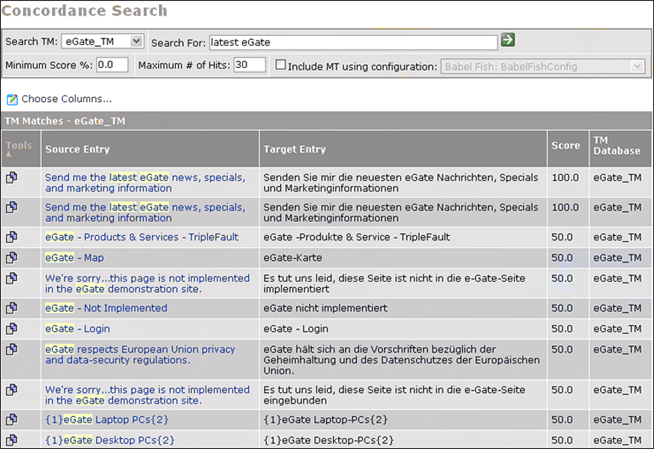
In the following search for the string latest eGate, WorldServer
found two 100% matches—that is, matches of the entire string—and several
50% matches—where only one of the two words was found.
You can select a translation memory and machine translation configuration
to search in. The default TM and MT used is based on the configuration
for the content being translated. Similarly, the source and target
language is inferred from the asset in context.
The scores are displayed for each match using the “concordance scoring”
method. The “concordance scoring” is the percentage of the sought
words being found in the match, regardless of the number of other
words in the segment. Normal fuzzy match scoring would have reported
this as a much lower match because fuzzy match scoring is a percentage
of the found words against the number of words in the segment.
The following example shows a concordance search when Include MT using configuration <MT configuration> is enabled.
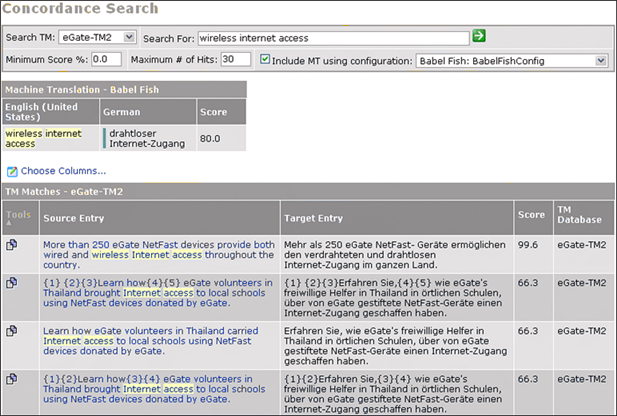
Machine translation matches return a concordance score equal to the
level set for the Fuzzy Score
Equivalent field when the MT adapter was configured. In this
example, all concordance scores returned by the BabelFish configuration
are 80.0. This does
not mean that you should use an MT match instead of any TM match with
a score of less than 80.0. The Fuzzy Score Equivalent is an advisory estimate of how your WorldServer administrator felt
a BabelFish match would compare on the translation memory scale. However,
since every match returned has the
same score, this value should not be used as the basis for a decision.
|
Note: In future versions of the MT adapters, they
will have guaranteed levels of quality (like High, Medium, Low), and
WorldServer will be able to make programmatic decisions based on comparisons
of the TM and MT scores.
|
The following rules apply to the concordance search:
-
Concordance results are case insensitive. However, a penalty is assessed for capitalization penalties in the same way they are assessed for standard and segment leverage match results. See the WorldServer Translation Memory Administration Guide for details about the TM score capitalization penalty property.