To help you see the differences between your source segment and the
fuzzy match found in the translation memory, WorldServer provides
a Highlight Differences feature, which is off by default. When you enable it and click the Translation memory matches icon to the right of a fuzzy matched segment pair, the Matches for Segment <N>
dialog window appears:
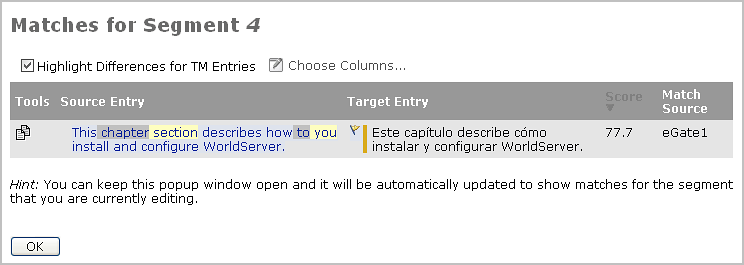
The gray highlight indicates that the TM entry contains the word
“chapter” and “to” but the source segment does not. The yellow highlight
means the TM entry does not contain “section” or “you” but the source
segment does. If the fuzzy-match score is high enough, you could paste
the target entry into your translation’s target segment, and then
use this information to adjust the target translation accordingly.
In this example, you would simply replace "Este capítulo" with "Esta
sección".