

| Adding a Preview UI Control |
For displaying the document preview your filter requires a suitable control element.
 Add a Web Browser Control
When implementing the static internal preview, we simply leveraged the built-in Web browser control of SDL Trados Studio 2014 (see Modifying the File Type Component Builder). Depending on the native file format that needs to be displayed, a different control might be required. For example, for DOC files SDL Trados Studio 2014 uses a Microsoft Word Viewer control. In this exercise, we are (once again) going to use a Web browser control. However, this time we will not leverage the built-in Web browser control, since we would like to demonstrate how to add and configure a custom control element.
Start by adding a user control called e.g. InternalPreviewControl.cs to your project. From the Visual Studio toolbox add a Web browser control, and assign the name webBrowserControl to it.
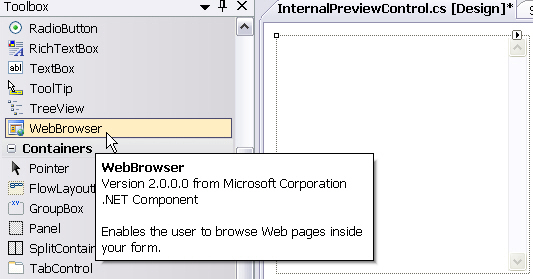 Implement the Preview Control Functionality
For your preview control to be able to respond to events such as the user clicking a segment in the editor, scrolling to a segment, etc., your control needs to implement the following code:
using System;
using System.Windows.Forms;
using System.Security.Permissions;
using Sdl.FileTypeSupport.Framework.IntegrationApi;
using Sdl.FileTypeSupport.Framework.NativeApi;

namespace Sdl.Sdk.FileTypeSupport.Samples.SimpleText.Preview
{
    [PermissionSet(SecurityAction.Demand, Name = "FullTrust")]
    [System.Runtime.InteropServices.ComVisibleAttribute(true)]
    public partial class InternalPreviewControl : UserControl
    {
        string _activeSegId = String.Empty;
        string _jumpparagraphID = String.Empty;
        string _jumpsegmentID = String.Empty;
        bool _segmentSelectedFromBrowser = false;


        public event PreviewControlHandler WindowSelectionChanged;

        public InternalPreviewControl()
        {
            InitializeComponent();
            //set the properties of the webbrowser component
            webBrowserControl.AllowWebBrowserDrop = false;
            webBrowserControl.IsWebBrowserContextMenuEnabled = false;
            webBrowserControl.WebBrowserShortcutsEnabled = false;
            webBrowserControl.ScriptErrorsSuppressed = true;
            webBrowserControl.AllowNavigation = false;
            webBrowserControl.ObjectForScripting = this;
            webBrowserControl.DocumentCompleted += new WebBrowserDocumentCompletedEventHandler(webBrowserControl_DocumentCompleted);
        }

        void webBrowserControl_DocumentCompleted(object sender, WebBrowserDocumentCompletedEventArgs e)
        {
            ScrollToElement(_activeSegId);

            //set the CSS style for the curently selected segment
            webBrowserControl.Document.InvokeScript("setActiveStyle", new String[] { _activeSegId });
        }

        protected void FireWindowSelectionChanged()
        {
            if (WindowSelectionChanged != null)
            {
                WindowSelectionChanged(null);
            }
        }

        /// <summary>
        /// open file for preview
        /// </summary>
        /// <param name="fileName"></param>
        public void OpenTarget(string fileName)
        {
            if (this.InvokeRequired)
            {
                this.Invoke(new System.Action<string>(OpenTarget), fileName);
            }
            else
            {
                webBrowserControl.Navigate(fileName);
                webBrowserControl.Refresh();
            }
        }

        public void Close()
        {
            // The Filter Framework takes care of cleaning up temporary files.
        }

        /// <summary>
        /// construct a segment reference from _jumpparagraphID and _jumpsegmentID,
        /// which is returned when user clicks the corresponding segment in the preview control
        /// </summary>
        /// <returns></returns>
        public SegmentReference GetSelectedSegment()
        {
            if (_jumpsegmentID != null && _jumpsegmentID != String.Empty)
            {
                SegmentReference segRef = new SegmentReference(default(FileId), new ParagraphUnitId(_jumpparagraphID), new SegmentId(_jumpsegmentID));
                return segRef;
            }
            return null;
        }

        /// <summary>
        /// public method that is called from the preview control
        /// when a segment has been selected
        /// </summary>
        /// <param name="segmentId"></param>
        public void SelectSegment(string paragraphUnitID, string segmentID)
        {
            // set global variables for jumping into clicked segment
            _jumpparagraphID = paragraphUnitID;
            _jumpsegmentID = segmentID;

            _segmentSelectedFromBrowser = true;
            FireWindowSelectionChanged();
        }

        /// <summary>
        /// scroll to the active segment inside the control
        /// </summary>
        /// <param name="elemName"></param>
        private void ScrollToElement(String elemName)
        {
            if (webBrowserControl.Document != null)
            {
                HtmlDocument doc = webBrowserControl.Document;
                HtmlElementCollection elems = doc.All.GetElementsByName(elemName);
                if (elems != null && elems.Count > 0)
                {
                    HtmlElement elem = elems[0];

                    elem.ScrollIntoView(true);
                }
            }
        }


        /// <summary>
        /// called when segment is confirmed and SDL Trados Studio jumps into next segment
        /// </summary>
        public void JumpToActiveElement()
        {
            if (this.InvokeRequired)
            {
                this.Invoke(new MethodInvoker(JumpToActiveElement));
            }
        }


        /// <summary>
        /// scroll to and highlight active segment in the preview control
        /// </summary>
        /// <param name="segment"></param>
        public void ScrollToSegment(SegmentReference segment)
        {
            if (this.InvokeRequired)
            {
                this.Invoke(new System.Action<SegmentReference>(ScrollToSegment), segment);
            }
            else
            {
                if (!_segmentSelectedFromBrowser)
                {
                    ScrollToElement(segment.SegmentId.Id);

                    // handle situations in which the document was opened
                    // and no active segment has been set yet.
                    if (_activeSegId == null || _activeSegId == "")
                    {
                        _activeSegId = segment.SegmentId.Id;
                        // select the CSS style for the curently selected segment
                        webBrowserControl.Document.InvokeScript("setActiveStyle", new String[] { segment.SegmentId.Id });
                    }
                }

                if (_activeSegId != segment.SegmentId.Id)
                {
                    // reset the CSS style back from active to normal for the previously selected segment
                    if (_activeSegId != null || _activeSegId == "")
                    {
                        webBrowserControl.Document.InvokeScript("setNormalStyle", new String[] { _activeSegId });
                    }
                    // set the CSS style for the curently selected segment
                    webBrowserControl.Document.InvokeScript("setActiveStyle", new String[] { segment.SegmentId.Id });
                }

                // set the active segment id
                _activeSegId = segment.SegmentId.Id;

                if (_segmentSelectedFromBrowser)
                {
                    _segmentSelectedFromBrowser = false;
                }
            }

        }
    }
}
CommunityComments