

| Extracting Comments |
In this chapter you will learn how to extract comments from a given BIL file and add them to the intermediary (SDL XLIFF) document.
 About Comments
A unit in a BIL file can contain one or more comments, e.g.:
<comment>This segment was translated using web translator.</comment>
Extend the Helper Function for Creating Paragraph UnitsFirst, add the following to the CreateParagraphUnit() helper function:
// extract comment (if applicable)
if(xmlUnit.SelectSingleNode("comment")!=null)
{
    paragraphUnit.Properties.Comments = CreateComment(xmlUnit.SelectSingleNode("comment").InnerText);
}
The complete CreateParagraphUnit() helper function looks as shown below:
// helper function for creating paragraph units
private IParagraphUnit CreateParagraphUnit(XmlNode xmlUnit)
{
    // create paragraph unit object
    IParagraphUnit paragraphUnit = ItemFactory.CreateParagraphUnit(LockTypeFlags.Unlocked);


    // create segment pair object
    ISegmentPairProperties segmentPairProperties = ItemFactory.CreateSegmentPairProperties();
    // assign the appropriate confirmation level to the segment pair
    segmentPairProperties.ConfirmationLevel=CreateConfirmationLevel(xmlUnit.Attributes["status"].Value);

    // add source segment to paragraph unit
    ISegment srcSegment = CreateSegment(xmlUnit.SelectSingleNode("source/seg"), segmentPairProperties);
    paragraphUnit.Source.Add(srcSegment);

    // add target segment to paragraph unit if available
    if(xmlUnit.SelectSingleNode("target/seg") != null)
    {
        ISegment trgSegment = CreateSegment(xmlUnit.SelectSingleNode("target/seg"), segmentPairProperties);
        paragraphUnit.Target.Add(trgSegment);
    }

    #region "context"
    // create paragraph unit context
    string id = xmlUnit.SelectSingleNode("./@id").InnerText;
    if(xmlUnit.SelectSingleNode("type/@spec")!=null)
    {
        string spec = xmlUnit.SelectSingleNode("type/@spec").InnerText;

        paragraphUnit.Properties.Contexts=CreateContext(spec, id);
    } else {
        paragraphUnit.Properties.Contexts = CreateContext("Paragraph", id);
    }
    #endregion

    #region "comments"
    // extract comment (if applicable)
    if(xmlUnit.SelectSingleNode("comment")!=null)
    {
        paragraphUnit.Properties.Comments = CreateComment(xmlUnit.SelectSingleNode("comment").InnerText);
    }
    #endregion

    return paragraphUnit;
}
Add a Helper Function for Generating the CommentsBelow you see the helper function that actually generates the comments in the intermediary (SDL XLIFF) file. When generating a comment through the properties factory you need to provide the following parameters: the comment text, the user who added the comment (in this case we just use a hard-coded string to keep this example simple), and the Severity level, which we set to Medium.
private ICommentProperties CreateComment(string commentText)
{
    ICommentProperties commentProperties = PropertiesFactory.CreateCommentProperties();
    IComment comment = PropertiesFactory.CreateComment(commentText, "SDK Sample", Severity.Medium);
    commentProperties.Add(comment);

    return commentProperties;
}
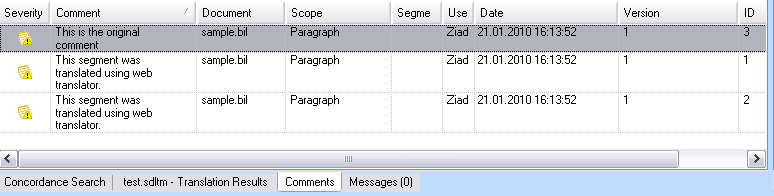
In SDL Trados Studio 2014 the comments will be visible in the Comments windows. Double-clicking a comment here will lead you directly to the corresponding paragraph unit / segment pair in the editor.
 CommunityComments