

| Creating the Translation Provider Factory |
This section explains how to create a translation provider factory, which allows applications like SDL Trados Studio 2017 to create translation provider instances based from a specific URI.
 Overview
The translation provider factory component provides the functionality to instantiate translation providers. The factory component has to implement the ITranslationProviderFactory interface, which essentially consists of three methods:
- SupportsTranslationProviderUri: Determines whether the factory supports the specified translation provider URI. See The Translation Provider URI Scheme.
- CreateTranslationProvider: Creates a new translation provider identified by the specified URI and loads previously serialized state information.
- GetTranslationProviderInfo: Provides a lightweight way to determine the translation method used by translation providers created by the factory without having to create a translation provider instance.
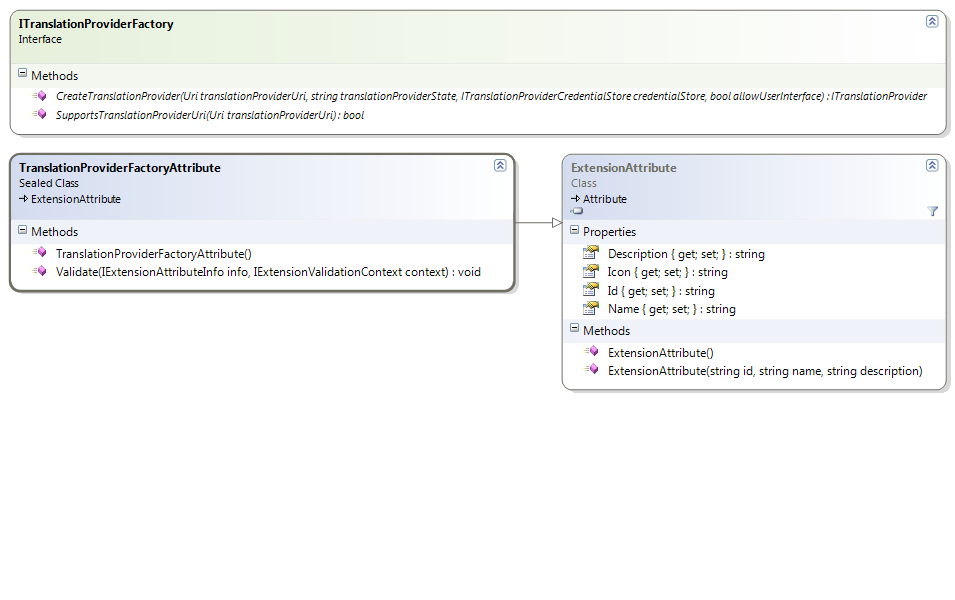 Registering the Extension
In order for the translation provider factory component to become available for use by host applications such as SDL Trados Studio 2017, it has to be marked up with a TranslationProviderFactoryAttribute. This is a plug-in framework extension attribute that will be extracted into the plug-in manifest.
The Name, Description and Icon values are for information only and are not being used in SDL Trados Studio 2017 at the moment.
The Translation Provider URI SchemeAs mentioned above, the host application determines which factory to use to create a particular translation provider using the SupportsTranslationProviderUri method. For this reason, every translation provider implementation should define its own unique URI protocol. The factory can then see whether the specified URI matches this protocol in order to determine whether it supports that particular URI.
SDL Trados Studio 2017 has the ability to sequence translation providers which allows users to perform lookups across all the translation providers in the sequence. This sequence cannot contain duplicate translation providers. Two translation providers are considered duplicates if they have the same Uri and state (see SerializeState). If you want to allow the user to add mutliple instances of your translation provider into the same sequence, for instance with different settings, make sure that these settings are serialized as part of the state.
AuthenticationMost translation providers require authentication of some sort. For this reason, the CreateTranslationProvider has a credentialStore parameter. This is an ITranslationProviderCredentialStore object that is passed in by the host application and can be used by the factory to retrieve or store credentials. It is the host application's responsibility to manage those credentials. For instance, SDL Trados Studio 2017 stores the credentials in a file on the user's machine, but it does not send credentials around in packages for security reasons.
The credential store is essentially a dictionary that maps URIs to credentials. The API makes no assumptions about what form the credentials take and resepresents them as a string. It is up to the translation provider implementation handle the conversion of its credentials to and from a string representation of its choice.
By the time that CreateTranslationProvider is called, the caller or host application should have populated the credential store. You should throw a TranslationProviderAuthenticationException if there are no credentials available in the credential store that are appropriate for use with this particlaur translation provider. In SDL Trados Studio 2017, this will prompt the user to provide these credentials, after which the CreateTranslationProvider will be called again. Under no circumstances should the CreateTranslationProvider method attempt to show a logon user interface itself. For information on how to provide custom logon user interface for your translation provider, see Creating the Translation Provider UI Extension.
See AlsoOther Resources
CommunityComments