

| Creating Translation Provider Plug-ins |
This section provides an overview of how to create a translation provider plug-in, which allows applications like SDL Trados Studio 2017 to interact with automated translation engines, third-party translation memory implementations or other translation engines.
 Overview
A translation provider is a component which provides functionality to translate segments, i.e. sentences, from one language, the source language, into another language, the target language. A translation provider typically supports translation from many languages into many languages.
Examples of translation provider implementations are SDL Translation Memory, which performs translation of segments by looking them up in a file- or server-based translation memory database (FileBasedTranslationMemory or ServerBasedTranslationMemory) and the SDL Automated Translation Provider, which performs translations using SDL's automated translation engine.
SDL Trados Studio 2017 uses translation providers for a number of tasks:
- During project preparation, in the Analyze, Populate Project Translation Memory and Pre-translate batch tasks.
- During interactive translation, when the user performs lookups for segments in a document that is being translated in the SDL Trados Studio 2017 editor.
- During project finalization, in the TM Update task.
As mentioned above, SDL Trados Studio 2017 comes with a number of built-in translation provider implementations. In addition, SDL Trados Studio 2017 provides a plug-in mechanism that allows third-parties to create translation provider plug-ins. In order to create a translation provider plug-in, you need to create a number of classes:
- Translation Provider: This class represents the multilingual translation provider, which allows getting a Translation Provider Language Direction for a specific source-target language direction, which, in turn, exposes the translation functionality for that language direction. This translation provider class should implement the ITranslationProvider interface.
- Translation Provider Language Direction: This class exposes translation functionality for a specific source-target language direction.
- Translation Provider Factory Extension: This is a plug-in framework extension class that can create instances of the translation provider based on a specific URI. SDL Trados Studio 2017 uses this class to create instances of translation providers from URIs that it has stored in translation projects. Every translation provider implementation should define a URI scheme that can be used to build URIs that uniquely identify the translation provider.
- Translation Provider UI Extension: This is a plug-in framework extension class that provides user interface functionality that allows SDL Trados Studio 2017 to browse for translation providers, edit translation provider settings, and display translation providers in a unified way. SDL Trados Studio 2017 selects the appropriate UI Extension based on the translation provider URI.
The following diagram demonstrates how a translation plug-in is used by SDL Trados Studio 2017:
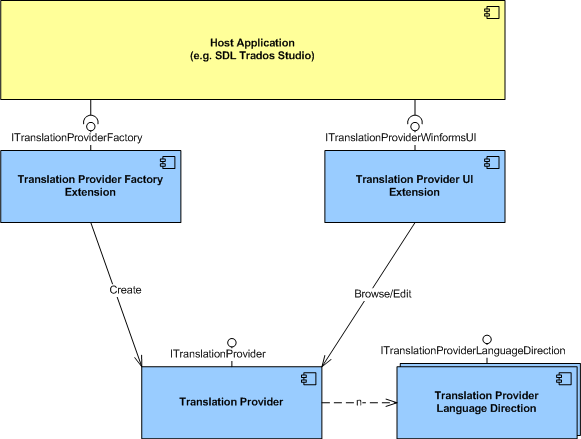
The following sections explain the various steps required in creating a translation provider plug-in in detail:
CommunityComments