

| Working with Database Servers and Containers |
This section describes how to work with database servers and translation memory containers.
 Overview
All server-based translation memories reside in a database that is typically seperate from the main TM server database. Such a database is called a translation memory container. TM Server supports spreading the server-based translation memories in the system across multiple translation memory containers.
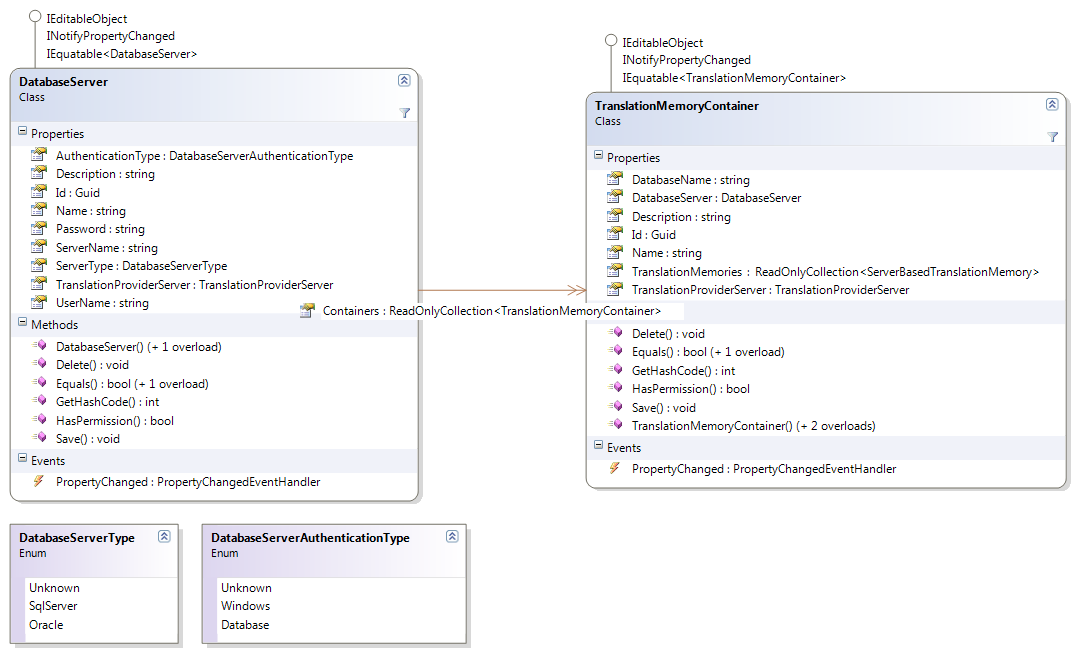
The API uses the following two classes to model these concepts:
- DatabaseServer: A database server that hosts one or more translation memory containers. In order to use a database server for hosting translation memory containers, it has to be registered with the system. See Registering a Database Server.
- TranslationMemoryContainer: A translation memory container is a database that is hosted on one of teh registered database servers. Every container can host one or more server-based translation memories (ServerBasedTranslationMemory). See Creating a Translation Memory Container:
 Registering a Database Server
In order to register a database server with TM Server, create a new DatabaseServer object. Set its Name property (=display name) and ServerName property (=actual IP address or DNS name of the database server). Choose which type of authentication will be used to access the database server by setting the AuthenticationType property. You can use either Windows authentication, which means the Windows account that is running the application server is used for accessing the database server; or Database authentication, which means you have to set the UserName and Password of the database account that should be used. Finally call Save to register the database server with the system.
Creating a Translation Memory ContainerIn order to create a translation memory container, create a new TranslationMemoryContainer object. Set the DatabaseServer on which the container database should be hosted, set its friendly name (Name) and the name of the actual database (DatabaseName). Finally call Save to create the translation memory container.
The DatabaseName property can be one of the following:
- The name of a database that should be created: The application server will create the database. Make sure that account specified for communicating with the database server has enough permissions to create a new database.
- The name of an existing, empty database: The application server will create the necessary schema inside the existing database.
- The name of an existing translation memory container: for migration purposes, you can register an existing container database. The system will inspect the database and register all the translation memories present in it.
CommunityComments