

| Creating the Translation Provider UI Extension |
This section explains how to create a translation provider UI extension, which allows applications such as SDL Trados Studio 2015 to browse for translation providers, edit translation provider settings, display translation providers in a unified way and prompt the user for translation provider credentials.
 Overview
The translation provider UI component is a plug-in framework extension that allows applications such as SDL Trados Studio 2015 to browse for translation providers, edit translation provider settings, display translation providers in a unified way and prompt the user for translation provider credentials.
The translation provider UI component is essentially optional, depending on where the translation provider is meant to be used. A fully functional SDL Trados Studio 2015 translation provider implementation needs a translation provider UI component, but for other sceanrios it is perfectly valid to just implement a translation provider factory, for instance when the translation provider will be used in a server scenario only.
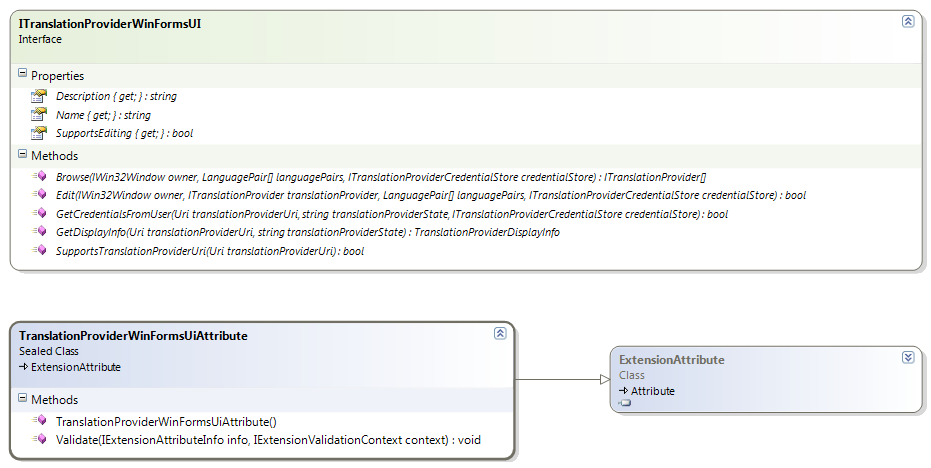
The translation provider UI component has to implement the ITranslationProviderWinFormsUI interface
 Registering the Extension
In order for the translation provider UI component to become available for use by host applications such as SDL Trados Studio 2015, it has to be marked up with a TranslationProviderWinFormsUiAttribute. This is a plug-in framework extension attribute that will be extracted into the plug-in manifest.
The Name, Description and Icon values of the extension attribute are for information only and are not being used in SDL Trados Studio 2015 at the moment.
Browsing for Translation ProvidersOne of the responsibilities of the translation provider UI component is to allow the user to select translation providers through a user interface. The Browse method is called by SDL Trados Studio 2015 when the user selects the corresponding "Add -> Translation provider X..." menu item in the translation providers list.
Editing Translation Provider SettingsAfter the user has added a translation provider to the translation providers list in SDL Trados Studio 2015, the UI component can also allow its changing properties or settings. If the SupportsEditing property returns True, a "Settings..." button will become available when a translation provider supported by the UI component is selected. When clicked, SDL Trados Studio 2015 calls the Edit method.
Displaying Translation ProvidersSDL Trados Studio 2015 persists the translation provider list by persisting the Uri and state information. In order to display the list of translation providers in the user interface, SDL Trados Studio 2015 does not necessarily instantiate all the translation providers. For this reason, the UI component also needs to be able to provide display information, given a certain translation provider Uri and state. This way, the translation provider UI component has the possibility of generating this information in a more lightweight way then by instantiating the translation provider itself, which might for instance involve connecting to a server, etc.
Prompting for User CredentialsThe final responsibility of the Translation provider UI component is asking the user for credentails when these are required. SDL Trados Studio 2015 does not necessarily persist credentials stored in the credential store (ITranslationProviderCredentialStore), which means that there will be situations where SDL Trados Studio 2015 needs to prompt the user for credentials. In order to do this, SDL Trados Studio 2015 calls the appropriate translation provider UI component, which in turn can show a log-on user interface that is appropriate for that particular translation provider and subsequently add these credentials to the translation provider credential store so they become available to the translation provider factory to instantiate the translation provider and perform the necessary authentication.
See AlsoOther Resources
CommunityComments