

| Working with Language Resources |
This section describes how to work with language resources within translation memories and fields templates.
 Language Resources
Translation memories have support for storing custom language resources, such as segmentation rules, abbreviations, ordinal followers and variables. Storing these resources in the translation memory ensures that the correct resources are consistenly being used when segmenting content that is targeting the translation memory. This ensures consistent, optimal translation re-use.
The language resources within a translation memory or language resources template are represented by a LanguageResourceBundleCollection. This is a collection of LanguageResourceBundle objects, each of which represents language resources for a specific language. A translation memory can store language resources for its source language or languages.
Server-based translation memories have the ability to inherit their language resources from a language resources template (ServerBasedLanguageResourcesTemplate). When that is the case, the field definitions can be centrally managed via the language resources template, but not on the translation memory itself. For more information, see Working with Language Resource Templates.
There are four types of customizable language resources:
- Abbreviations: The segmentation engine uses a default source language abbreviation list when segmenting text. The abbreviation list contains the most common, frequently used abbreviations in the source language, such as max., min. and usd., and all of the abbreviations are followed by a full stop. If the segmentation engine finds a full stop preceded by text, adn the text appears in the abbreviation list, the engine interprets the full stop as an abbreviation punctuation mark and keeps reading until the next full stop. The abbreviations list can be manipulated through a Wordlist object.
- Ordinal followers: The segmentation engine uses a default source language ordinal follower list when segmenting text. An ordinal follower, or ordinal noun, is a word that is typically found following a number. The ordinal nouns list allows the segmentation engine to read past instances of the full stop that are preceded by a number and followed by an ordinal noun. This aspect of segmentation is not relevant for all languages, but it is particularly useful for the German language. A dot is not interpreted as a segment boundary marker if it is preceded by a number and followed by an ordinal noun. The ordinal followers list can be manipulated through a Wordlist object.
- Segmentation rules: Segmentation rules are rules that govern how text is broken up into segments. Segments can be paragraph or sentence length. As a general rule, in Englsih, a full stop, exclamation mark, question mark, colon, tab character or end of paragrah mark indicate the end of a sentence when they are followed by a space. A quotation mark (" or '") or a closing parenthesis ()) may follow the closing punctuation mark and precede the space. A semicolon (;) does not end a sentence. The segmentation rules can be customized via the SegmentationRules object.
- Variables:
This is a customized list of variables in the translation memory setup. Each item on the list is treated as a non-translatable (placeable) element.
For example, you may not want to translate a company name. Adding it to the variable list identifies this as untranslatable content. The properties of the variable list are as follows:
- Variables must appear exactly as they do in your documents.
- Each item in the list must be on a line of its own.
- Punctuation inside variables, such as hyphens or commas, is not supported.
- As well as the variables themselves, the list can include comments or headings. Comments or headings must be directly preceded by the hash symbol (#), for example, #comment.
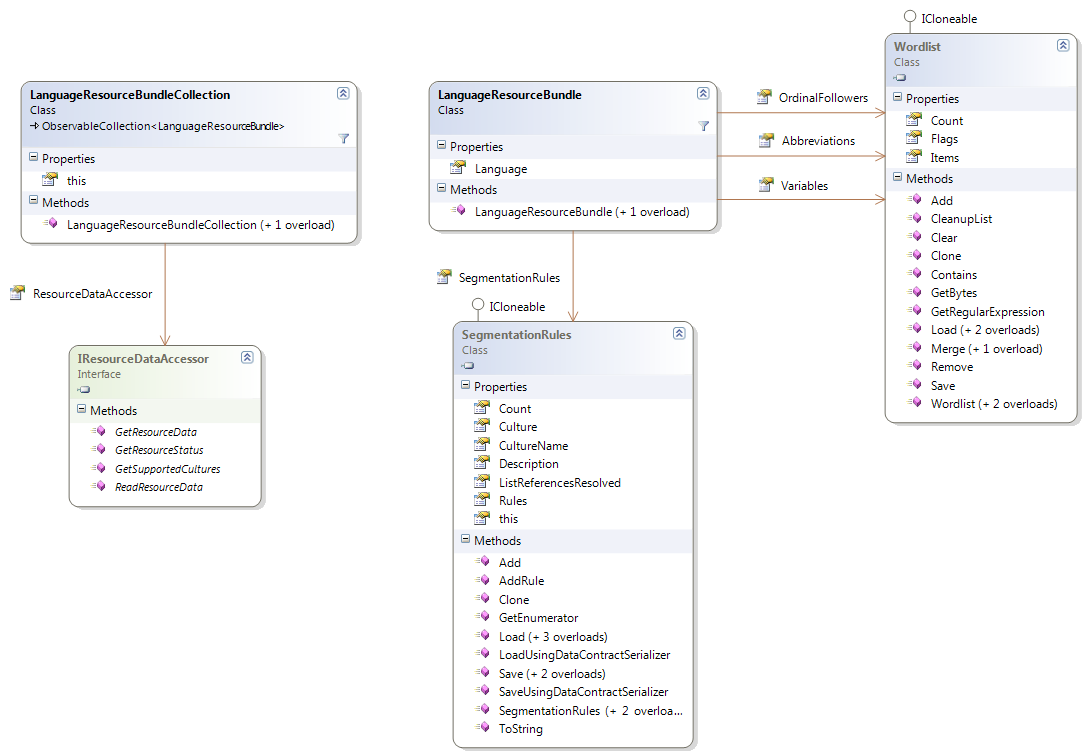
In order to define custom language resources for a given language, you have to create a LanguageResourceBundle object for that language. Subsequently for instance, create a new Wordlist object, populated using a custom list of variables and assign it to the Abbreviations property. Finally add it to the language resource bundles collection and save the translation memory or language resources template that own the collection in order to persist the changes.
Often, when defining custom language resources, the most common scenario is making changes to the default set of language resources. The default language resources can be retrieved from the DefaultLanguageResourceProvider, or by calling GetDefaultLanguageResources in a server scenario. Note that this is only really required when accessing the default language resources from Silverlight, since the DefaultLanguageResourceProvider is not available in Silverlight. Both methods returns the same defaults, using the DefaultLanguageResourceProvider is more efficient since no server roundtrips are required to retrieve the default language resources.
See AlsoCommunityComments