Use the Translation Quality Assessment (TQA) feature to measure the quality of a translation using your chosen criteria.
As a project manager, you choose a TQA configuration and use it to automatically assess the quality of a translation document.
The TQA configuration specifies:
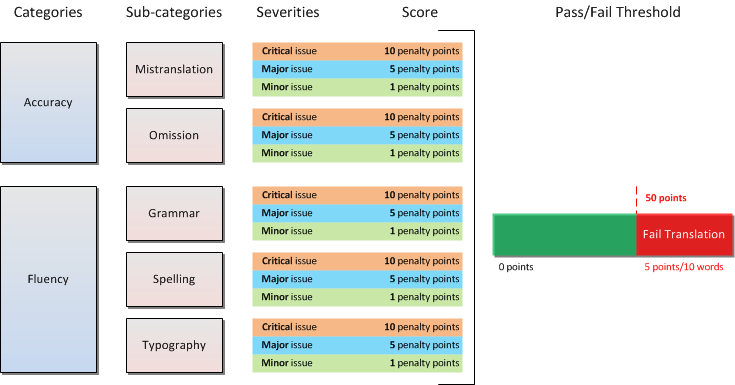
The image below shows an example of a TQA configuration with two categories, with their defined sub-categories, three severities and a threshold limit of five points per each ten words. This means that Studio fails the TQA check for a translation document of 100 words if the reviewer indicates issues that sum up more than 50 penalty points.
As a reviewer, you use the metrics available in the TQA configuration to evaluate translations.
The reviewing is done in the Assess Quality mode.
The Assess Quality mode can only be enabled for projects with an available TQA configuration.
As you review translations in TQA mode using the metrics defined in the configuration, Studio automatically computes the score corresponding to each metric that you use. If the issues in the document exceed the limit specified on the Pass/Fail Threshold, Studio marks the document as failed.
Creating a Translation Quality Assessment Configuration
Reviewing Documents in TQA Mode
TQAs window in the Editor view