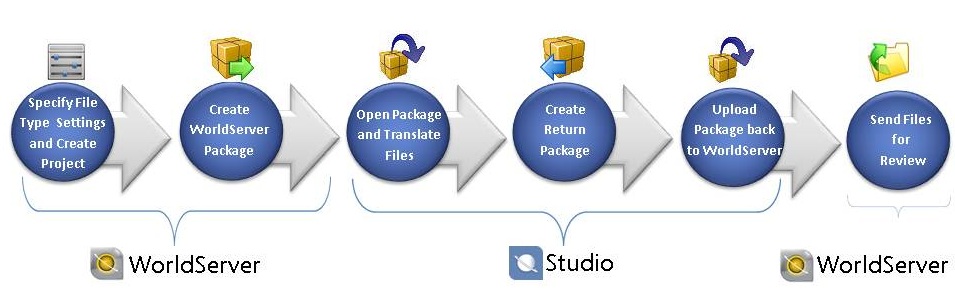
Assume you are a translator. You receive an assignment from a project manager to localize several MS Word .docx files that contain information about the use of certain medications. Previous versions of these documents were translated last year.
The project manager sends the assignment in the form of a WorldServer package which contains the pre-processed files that have to be translated in Studio using the associated translation memories:
The WorldServer package also gives access to the WoldServer termbase associated with the project, shows the WorldServer File Attributes and Project Attributes and automatically sets the QA Checker Profile configurations** and the TM Penalties** defined by the WorldServer project manager.
The bilingual documents that the package contains have tracked changes in the source segments to indicate what updates need to be made for the current project.
Follow the workflow for WorldServer packages in a regulated industry to translate the documents and send them for review.
You would use this workflow if you received a project package from WorldServer that is for translation for a regulated industry.
The process requires that the project manager in WorldServer specifies certain filter settings that enable tracked changes to be viewed in the source segments in Studio. The steps you follow in Studio also indicate what settings you need to specify and the practices that you need to follow to ensure that changes to translations are tightly controlled.
|
NOTE |
The workflow below is one of the suggested ways that you could work with WorldServer and Studio when translating for a regulated industry. However, you can deviate from these steps. For example, the review step could be initiated from Studio as opposed to WorldServer. |
* For packages created in WorldServer 10.3 and higher.
** For packages created in WorldSever 10.4 and higher.
Step 1 and 2: Perform Initial Steps for Translation in WorldServer
Step 3: Translate Files from a WorldServer Package for a Regulated Industry