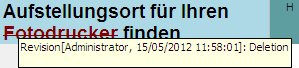
Further information about a tracked change can be viewed by hovering over the change with the mouse cursor. A tooltip is displayed showing the following information:
Why Tracked Changes in the Source are Useful
How to Track Suggested Changes
How to Accept or Reject Suggested Target Tracked Changes
How to Only Display Segments with Tracked Changes
How to Change When Track Changes is Automatically Turned On or Off