

| The Resources File |
The resources file contains the strings and elements that users will see in the user interface of SDL Trados Studio 2015 such as the plug-in name, icon, description.
The PluginResources.resx file is among the components that are provided by the project template. This resources file contains, among others, a string value called Plugin_Name. It defines the name of the plug-in assembly and will be preset to the name of the Visual Studio project. This is the name that will show up in the SDL Trados Studio 2015 plug-in management dialog. Any localizable strings referred to from the plug-in attribute or extension attributes should be defined in PluginResources.resx. The *.resx file will be compiled into a *.resources file, and will be deployed outside of the plug-in assembly itself, so the host application can access the information within it without having to load the plug-in assembly itself.
The resources file for our project should look as shown below:

Here are some explanations on the string resources:
- The Plugin_Name is the one that will be shown in the Plug-ins dialog box of SDL Trados Studio 2015 (which end users will open only on rare occasions).
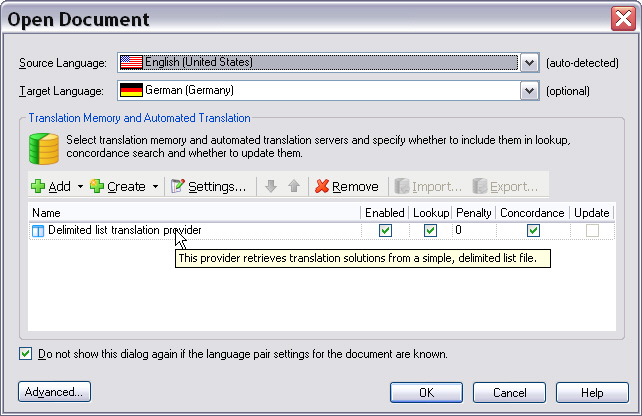
- The Plugin_NiceName is the one that will be displayed, for example, in the user interface of SDL Trados Studio 2015 when selecting a translation provider.
- The Plugin_Tooltip text will be displayed when users move the mouse pointer over the plug-in (nice) name or icon.
- The Plugin_Description contains further descriptive information on the plug-in.
 Note Note |
|---|
The value Plugin_Description is currently not supported, i.e. though you specify it, no plug-in description is currently shown in SDL Trados Studio 2015. |
In our implementation we also add an icon file (band_aid.ico) to the resources. The icon will later be displayed in the user interface of SDL Trados Studio 2015, which makes the plug-in more visually appealing.
The screenshot below illustrates how your plug-in will be shown in the UI of SDL Trados Studio 2015 after the user has selected it as a provider for a translation project:
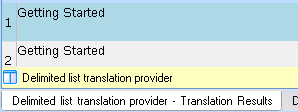
In the same manner we add a *.png file called band_aid.png to the resources. This image will be displayed later when a match has been found in the translation provider. This helps users distinguish your implementation from other translation providers.
The screenshot below illustrates how a match from your translation provider will later be shown to the user in SDL Trados Studio 2015, i.e. the plug-in graphic and the name:
| Note |
|---|
We recommend that you use an image with a transparent background for your plug-in. |
 See AlsoCommunityComments