

| Implementing the Plug-in User Interface |
The plug-in user interface needs to allow users to select the delimited list text file, and specify the delimiter character during runtime.
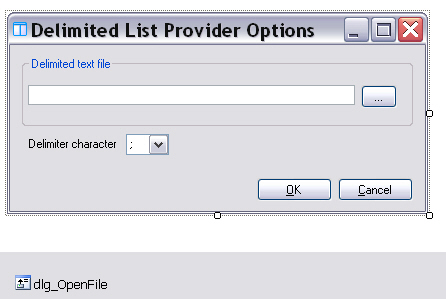
Add a form to your project called ListProviderConfDialog (this form is not part of the project template), which needs to have the following control elements.
- txt_ListFile: text field for entering the list file name and path.
- combo_Delimiter: combo list for selecting the delimiter character. Enter the following items: ; : = \t.
- btn_Browse: button for opening selecting the list text file.
- dlg_OpenFile: dialog for selecting the list file. The FileName property should be empty, the Filter property should be List text files (*.txt)|(*.txt)
- btn_Cancel: button for closing the form without applying new or changed settings.
- btn_OK: button for closing the form and applying new or changed settings.
 Implement the User Interface Functionality
Take the following steps to implement some of the basic user interface functions:
- Selecting the delimited text file:
The btn_Browse button should raise the Open File dialog for selecting
the delimited text file, and enter the file name into txt_ListFile:
C#
private void btn_Browse_Click(object sender, EventArgs e)
{
    this.dlg_OpenFile.ShowDialog();
    string fileName = dlg_OpenFile.FileName;

    if (fileName != "")
    {
        txt_ListFile.Text = fileName;
    }
}
- Applying the settings:
The btn_OK button should close the form and apply the
plug-in settings, i.e. the name and path of the text file and the delimiter character.
C#
private void bnt_OK_Click(object sender, EventArgs e)
{
    Options.Delimiter = this.combo_delimiter.Text;
    Options.ListFileName = this.txt_ListFile.Text;
}
 Note Note |
|---|
Of course, the form should also configure the plug-in settings, however, for this we need to implement a distinct ListTranslationOptions class, which we will implement in one of the following chapters (see Storing and Retrieving the Plug-in Settings). |
See AlsoCommunityComments